Terminology management that enforces itself
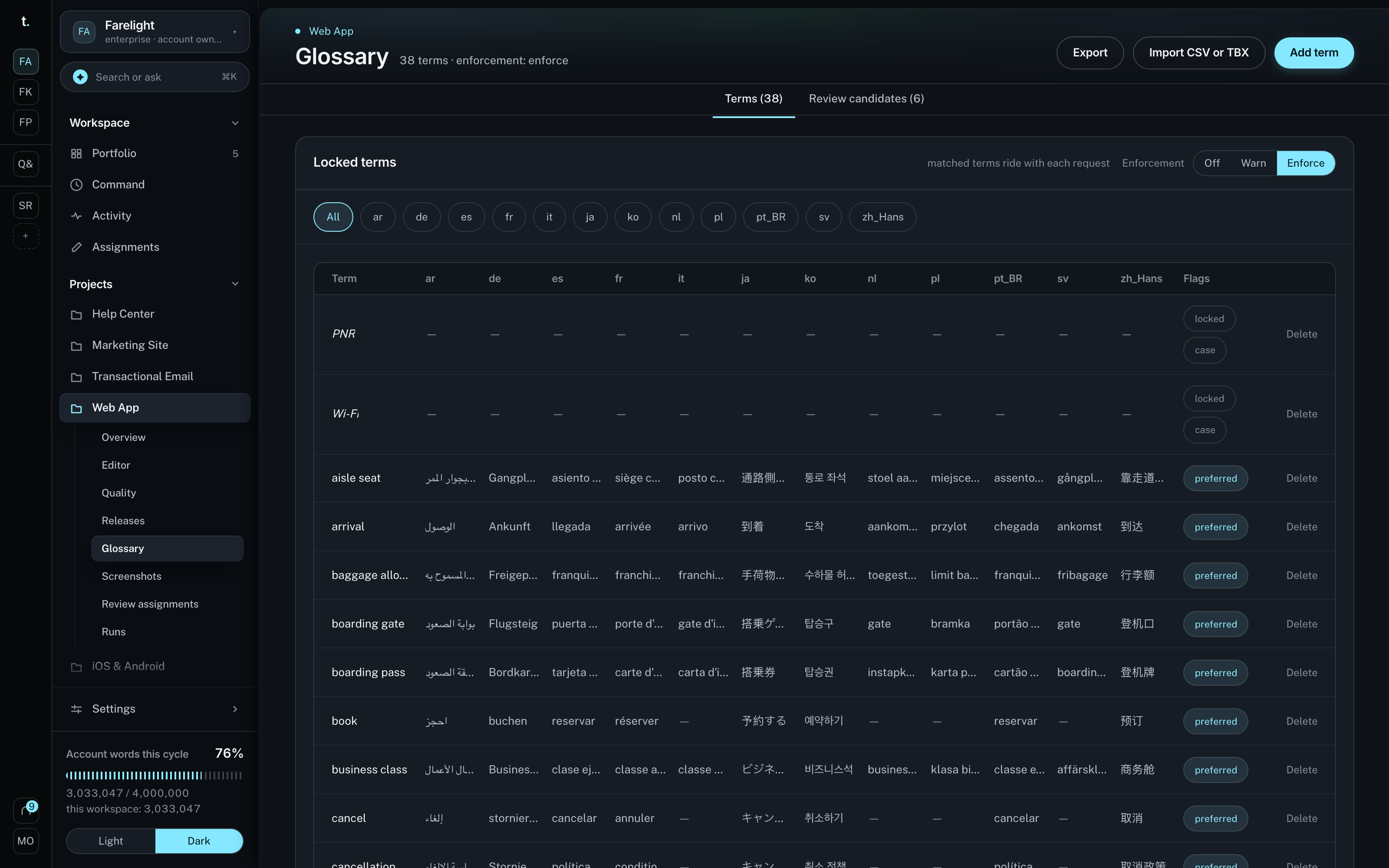
Define your terms once — per project or as an org-wide house glossary — and transglot keeps them consistent across every language. Mark terms do-not-translate or forbidden, import from CSV or TBX, and let AI mine candidates from your source strings for review.
Define a term once, keep it consistent everywhere
Every project gets a glossary automatically. Build an organization-wide house glossary and link it to as many projects as you like — when a normalized source term collides, the project-scoped term wins, so shared terminology never erases a local override.
Mark a term do-not-translate to keep it verbatim (brand names, product names), or forbidden to keep a rendering out of the target entirely. Each term carries mandated per-locale renderings, an optional part-of-speech, notes, and a case-sensitivity flag that is enforced case-exactly.

Matching is a single Aho–Corasick pass per chunk, built once per glossary version, so the cost is O(text) and independent of how many terms you define. Above 5,000 terms, matching switches to a Postgres trigram-candidate tier to keep the in-memory automaton bounded.
Only the terms that actually occur in a chunk — capped at 40, forbidden-first — ride into the Claude prompt as per-item data, never in the cached system block, so prompt caching stays byte-identical. After translation, a deterministic check scans the output for expected and forbidden terms.
What the glossary gives you
- Project & org-wide glossaries — every project gets a glossary automatically, and an organization-wide house glossary can be linked to many projects. On a term collision, the project-scoped term wins.
- Do-not-translate & forbidden terms — keep a term verbatim, or keep a rendering out of the target entirely. A forbidden term in a translation is always a hard failure, never softened.
- Per-locale targets, case-sensitivity & part-of-speech — each term carries mandated per-locale renderings, an optional part-of-speech, notes, and a case-sensitivity flag enforced case-exactly.
- Injected into the prompt, validated after — only the terms that appear in a chunk ride into the Claude prompt as per-item data (never in the cached system block), so translation stays cache-efficient.
- Warn or enforce — choose the enforcement mode per project. In warn mode a missing mandated term is flagged; in enforce mode it becomes a hard failure that triggers a corrective retry on the quality model.
- CSV & TBX import/export — bring an existing termbase in from CSV or TBX (ISO 30042) and export it back out. CSV import streams row-by-row to stay memory-bounded, with a formula-injection guard on export and an XXE-hardened TBX reader.
- AI candidate mining — transglot scans your source strings for recurring terms and proposes them as pending glossary candidates for a human to approve or reject. Incremental, quota-aware, and never auto-approved.
How a term reaches — and holds — the translation
- Define the term once — add a source term with its per-locale targets, or mark it do-not-translate or forbidden. Keep it in a project glossary or an org-wide house glossary linked to many projects.
- Match it in the source — a single Aho–Corasick automaton, built once per glossary version, scans each chunk in one pass to find exactly which terms occur, case-exactly for case-sensitive terms.
- Inject only what’s relevant — just the matched terms (capped at 40 per chunk, forbidden-first) ride into the Claude prompt as per-item data, never in the cached system block, so prompt caching stays byte-identical.
- Validate the output — a deterministic check scans the target: a forbidden term present is always a hard failure; a mandated term missing is a warning or, in enforce mode, a hard failure that triggers a corrective retry.
Choose how strictly terms are enforced
Enforcement is a per-project setting. The same matched terms feed every mode — only the consequence of a missing term changes. A forbidden term present in the target is always a hard failure, regardless of mode.
- Off — terms still ride into the prompt as guidance, but the post-translation check produces no findings.
- Warn (the default) — a missing mandated term is a soft finding you can review; a forbidden term is still a hard failure.
- Enforce — a missing mandated term becomes a hard failure that triggers the single corrective retry on the quality model.
Compared with a spreadsheet of terms
- Where terms live — a shared spreadsheet nobody keeps current, pasted into briefs per project; or a per-project glossary plus an org-wide house glossary linked to many projects.
- Enforcement — you hope translators read the term list and remember it; or terms ride into the prompt and are validated in the output deterministically.
- Forbidden wordings — a banned rendering slips through and ships before anyone notices; or a forbidden term in the target is always a hard failure that triggers a retry.
- Scale — a giant find-and-replace or a per-term regex loop crawls on big lists; or one Aho–Corasick pass per chunk, O(text), independent of term count.
- Growing the list — terms are added by hand, long after the drift has happened; or AI mines recurring source terms as pending candidates for a human to approve.
The rules that make enforcement predictable
Glossary behavior is deterministic and configurable, so you always know why a term matched — and what happens when it doesn’t.
- Project scope wins collisions — a project sees its own glossaries plus any linked org glossaries; when a normalized source term collides, the project-scoped term takes precedence.
- Warn or enforce, per project — in warn mode a missing mandated term is a soft finding; in enforce mode it becomes a hard failure that feeds the single corrective retry on the quality model.
- Case-sensitivity is exact — a case-sensitive term only matches verbatim, so “iOS” never matches “ios” and your capitalization survives.
- Bounded on huge glossaries — above 5,000 terms, matching switches to a Postgres trigram-candidate tier so the in-memory automaton stays bounded. A memory guard, not a slowdown.
- AI candidates, never auto-approved — extraction runs a frequency pre-pass then an AI significance pass that proposes terms as pending only. Terms are active, pending, or rejected; a human approves or rejects, and per-cycle ceilings cap the AI spend.
Why use transglot for localization?
Tools and outcomes
- Translate with Claude, guided by per-project style guides and brand voice
- Edit copy on top of your live app with the in-context editor and vision-grounded suggestions
- Enforce terminology with a glossary, including AI candidate extraction and import/export
- Flag mistranslations, terminology violations, and placeholder errors with Quality Mode
- Drive every step from CI — or from an AI agent — with the CLI, GitHub Action, REST API, MCP server, and signed webhooks
Keep exploring
Every part of transglot operates on the same projects and keys, so the next piece picks up exactly where this one leaves off.
Translation QA
Terminology checks are one part of the automated QA pass.
AI Translation
How glossary terms are honored during Claude translation.
For localization managers
Keep terminology consistent across translators and locales.
Frequently asked questions
Sharing a glossary across projects, do-not-translate versus forbidden, importing a termbase, and how AI candidates get approved.
Yes — build an organization-wide house glossary and link it to as many projects as you like. Each project also has its own glossary, and a project-scoped term wins any collision with the org glossary.