An Accent alternative for teams that would rather not run the server
Accent is an open-source translation platform from Mirego, free under the BSD-3-Clause licence, with no hosted plan: you run it on your own server. Transglot is hosted and priced per translated word. Here is what each side does and how to export an Accent project.
No server to run
Accent runs only on your own server, database and backups; Transglot is hosted, so there is nothing to deploy.
AI in every plan
Accent's machine translation runs on provider keys you supply and pay for; Glossa translates inside every Transglot plan.

Where Accent wins, and the catch.
Teams that run their own services
Accent suits engineering teams comfortable running a service from the official Docker image, who want a translation tool under their own control with no license fee and no per-word bill.
- The limitThe cost moves to operations: your server, database, backups and the time to run them, plus machine translation billed to your own keys.
- TransglotTransglot is hosted only and cannot be self-hosted. Glossa translation is inside the plan price, with no provider keys to manage.
Open source, no seat limits
Accent is free under the permissive BSD-3-Clause license, runs on your own infrastructure, and has no seat or word limits beyond what your server holds.
- The limitThere is no hosted plan: accent.reviews lists none, and its demo instance's database is pruned periodically.
- TransglotTransglot cannot be self-hosted, and the hosted platform is not open source. Free includes 3 seats and 100,000 welcome words.
History, rollback and lint in CI
Accent keeps a full change history with rollback, documents an open GraphQL API, and its CLI syncs and lints files in CI.
- The limitAccent does not translate on its own: machine translation needs DeepL or Google Translate keys configured on your instance.
- TransglotTransglot's CLI and GitHub Action push and pull from CI on paid plans and the free trial, automated QA checks come from Team, and Glossa drafts by default.
Accent vs Transglot, per translated word.
Both tools priced for the same workload. The per-word figure is the monthly cost divided by the translated words in that workload.
| Figure | TransglotTeam | AccentSelf-hosted (free, BSD-3-Clause) |
|---|---|---|
| Plan that holds the workload | Team 1,000,000 translated words a month included. | Self-hosted (free, BSD-3-Clause) There are no plans to size. Accent's site and README describe only self-hosting, through the official Docker image, docker-compose or Heroku, and a demo instance whose database is pruned periodically. |
| Listed price | $39 a month Launch price for new subscriptions. List price $49 a month. | Free to self-host; accent.reviews lists no hosted plan or price, and you pay for your own server |
| Monthly cost for this workload | $39 a month | Free to run yourself |
| What the price counts | Words per target language Each source word counts once for every language it is translated into. | Self-hosted, not metered Accent meters nothing: it is software you run, so 40,000 source words in 10 languages, 400,000 translated words, cost no licence fee. The cost is your server, database, backups and the time to run them, plus any DeepL or Google Translate usage billed to your own keys. There is no per-word figure to compare. |
| Price per translated word | $0.0000975 | Free to run yourself |
- Plan that holds the workload
- Team1,000,000 translated words a month included.
- Listed price
- $39 a monthLaunch price for new subscriptions. List price $49 a month.
- Monthly cost for this workload
- $39 a month
- What the price counts
- Words per target languageEach source word counts once for every language it is translated into.
- Price per translated word
- $0.0000975
- Plan that holds the workload
- Self-hosted (free, BSD-3-Clause)There are no plans to size. Accent's site and README describe only self-hosting, through the official Docker image, docker-compose or Heroku, and a demo instance whose database is pruned periodically.
- Listed price
- Free to self-host; accent.reviews lists no hosted plan or price, and you pay for your own server
- Monthly cost for this workload
- Free to run yourself
- What the price counts
- Self-hosted, not meteredAccent meters nothing: it is software you run, so 40,000 source words in 10 languages, 400,000 translated words, cost no licence fee. The cost is your server, database, backups and the time to run them, plus any DeepL or Google Translate usage billed to your own keys. There is no per-word figure to compare.
- Price per translated word
- Free to run yourself
One workspace, from first draft to release.
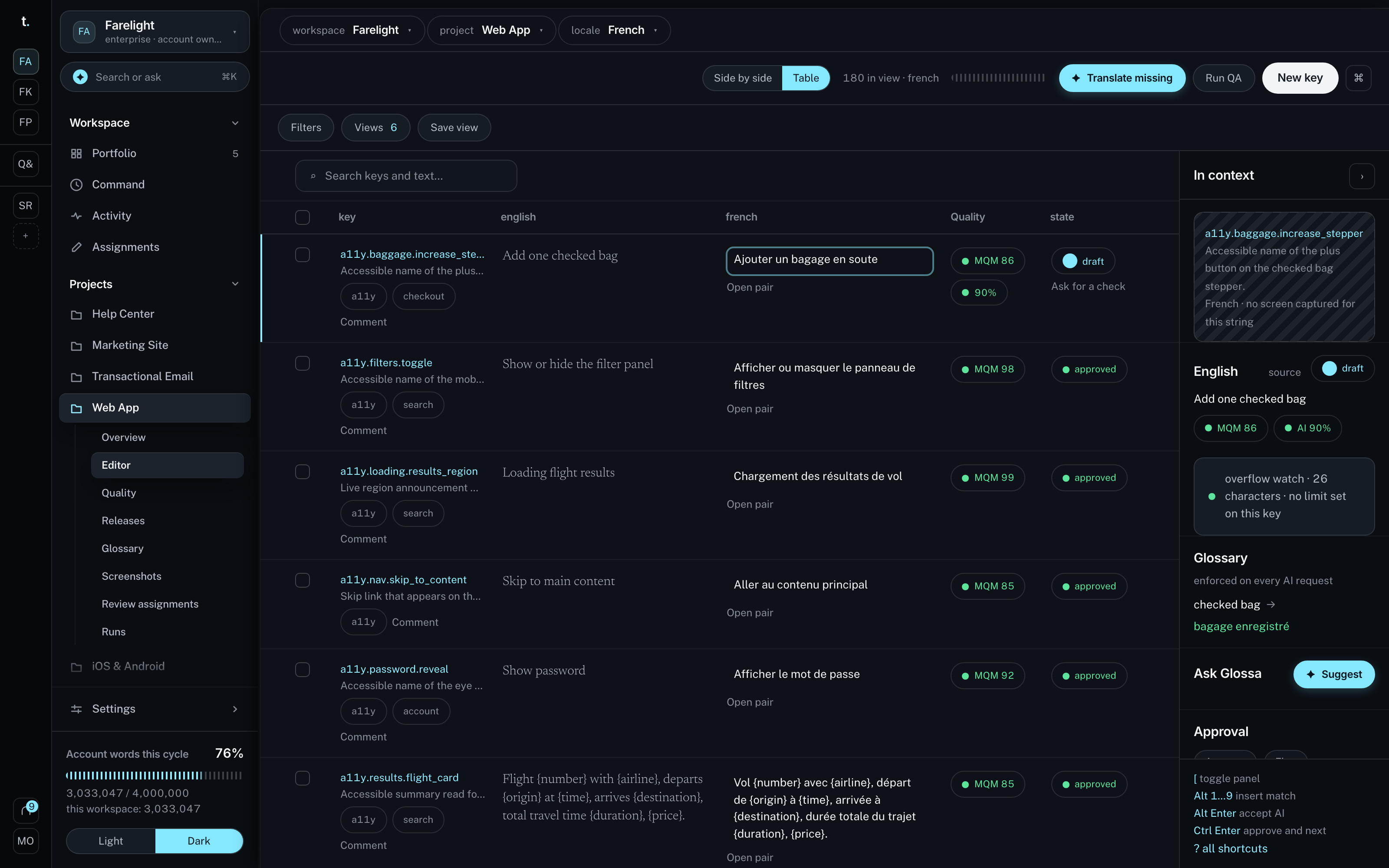
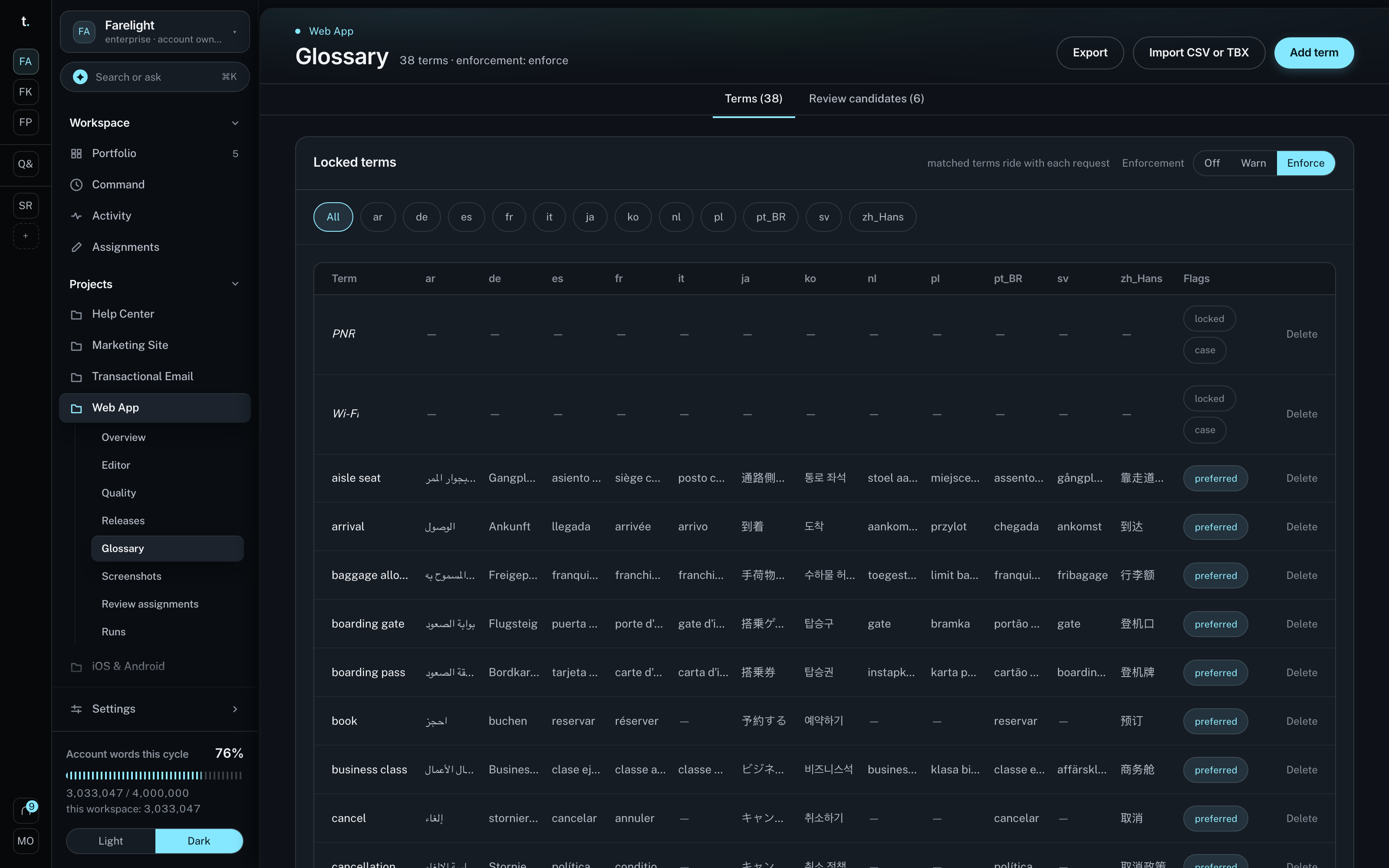
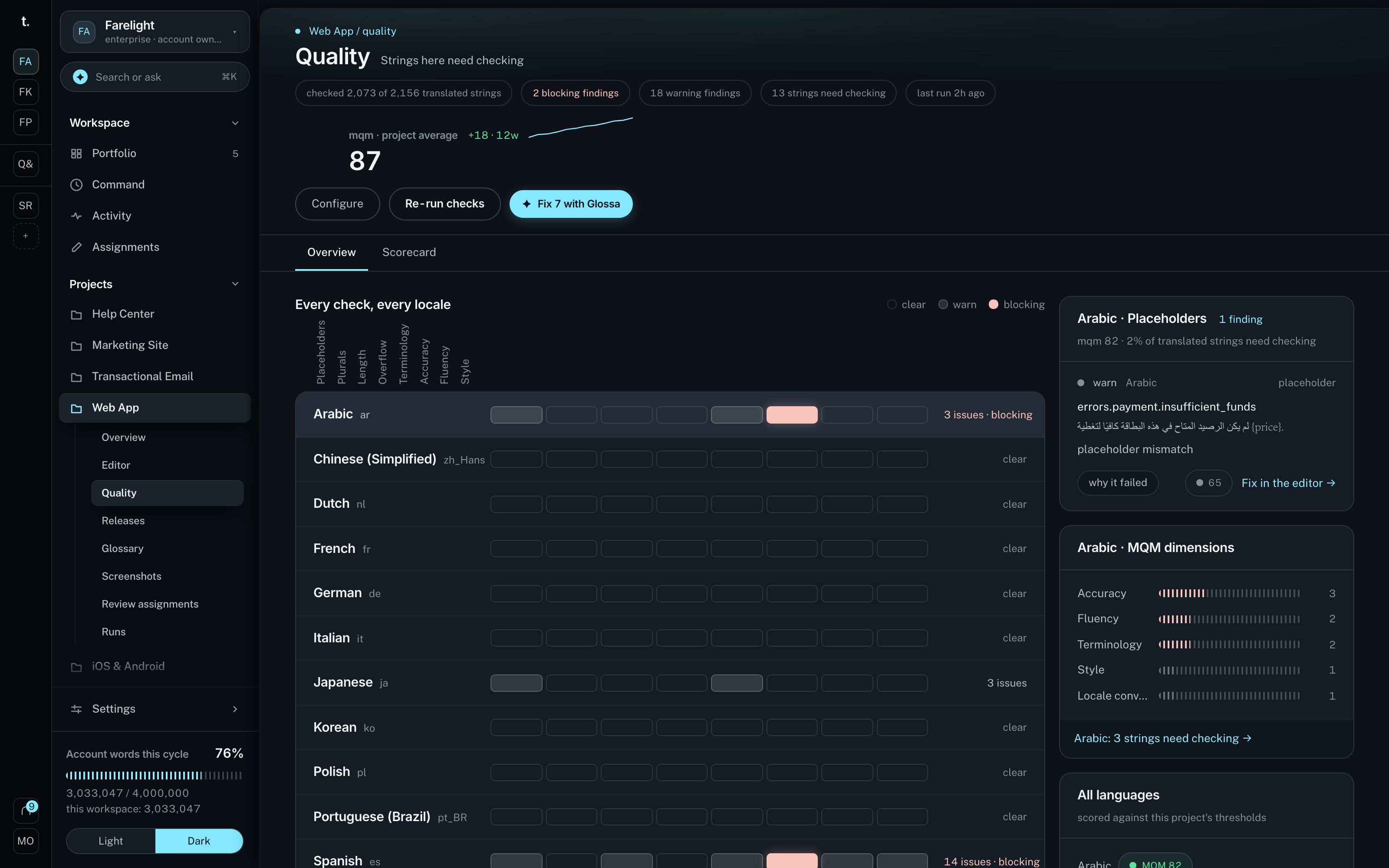
Real screens from the console, on a demonstration project.
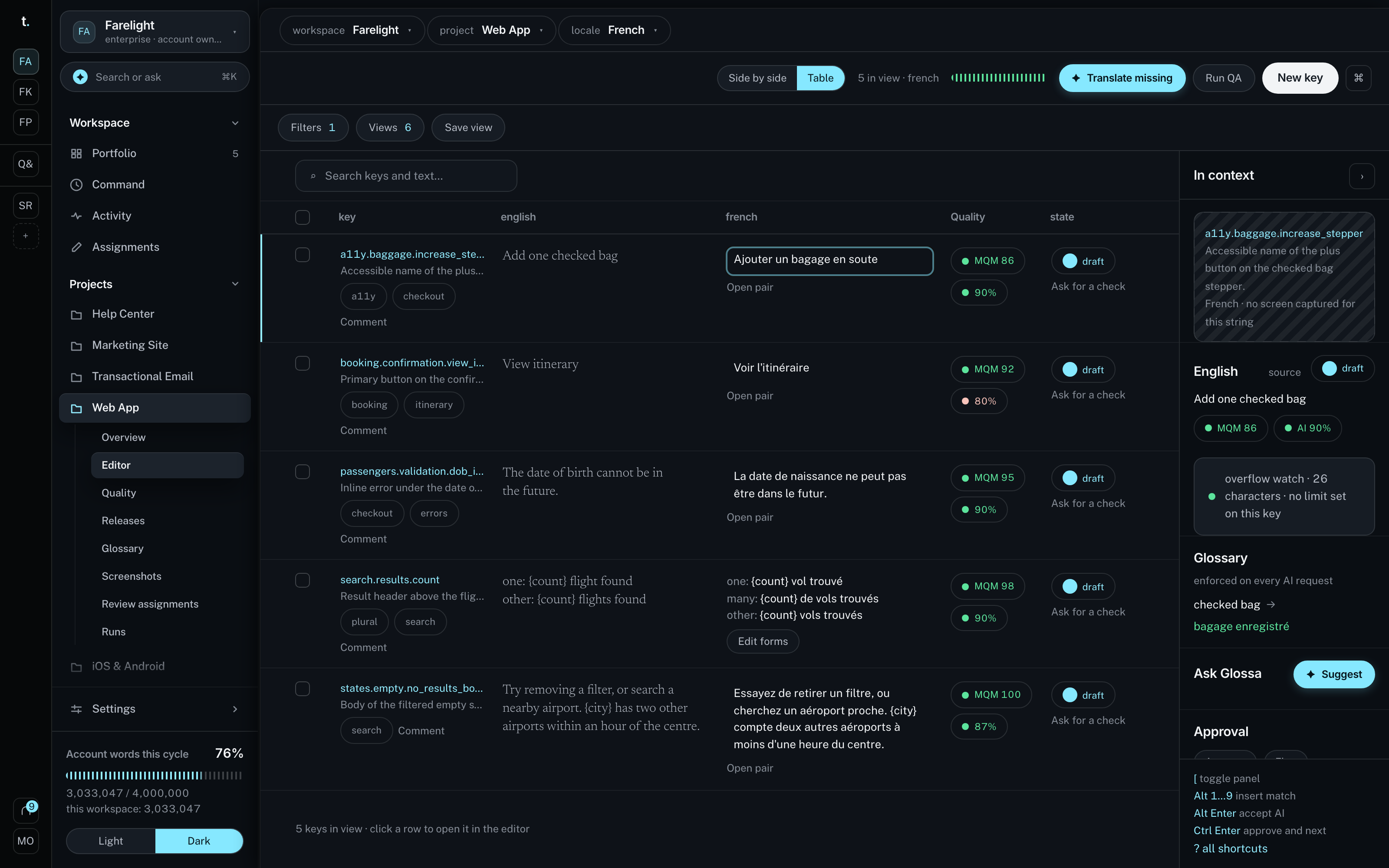
Transglot finds new strings on every push and Glossa drafts each language you have configured, inside the plan's word meter.
The source and every language sit side by side in the browser. A reviewer edits a cell and the next pull carries it.
Load the terms that must stay put. They go into every draft and are checked again afterwards.
Placeholders, plurals, glossary and length are checked on every row. A broken placeholder, plural or forbidden term gets one repair, then the row is refused rather than shipped. A length overrun is written, not refused.
What each tool includes.
| Feature | Transglot | Accent |
|---|---|---|
| Capabilities | ||
Self-hostingAccent: Docker image, docker-compose or Heroku. | ×No | ✓Yes |
| Hosted plan | ✓Yes | ×No |
Open-source codeAccent: BSD-3-Clause. | ×No | ✓Yes |
AI translation included in the planAccent: DeepL or Google Translate with your own keys. | ✓Yes | Partly |
Command-line toolTransglot: paid plans and the free trial. Accent: sync, export, stats and lint. | ✓Yes | ✓Yes |
APITransglot: paid plans. Accent: GraphQL. | ✓Yes | ✓Yes |
Automated QA checksTransglot: Team plan and up. Accent: lint, also from the CLI. | Partly | ✓Yes |
Free planAccent: free software; hosting is your cost. | ✓Yes | ✓Yes |
- Self-hosting
- ×No
- Hosted plan
- ✓Yes
- Open-source code
- ×No
- AI translation included in the plan
- ✓Yes
- Command-line tool
- ✓Yes
- API
- ✓Yes
- Automated QA checks
- Partly
- Free plan
- ✓Yes
- Self-hosting
- ✓Yes
- Hosted plan
- ×No
- Open-source code
- ✓Yes
- AI translation included in the plan
- Partly
- Command-line tool
- ✓Yes
- API
- ✓Yes
- Automated QA checks
- ✓Yes
- Free plan
- ✓Yes
Switch from Accent in three steps.
From the project directory, run accent export, which reads accent.json (API URL, API key, project id and the files list) and writes every language to the target paths it defines; add --order-by=key for stable files. Accent's formatters include Android XML, CSV, gettext, JSON and simple JSON, Java properties, Laravel PHP, Rails YAML, RESX 2.0, iOS .strings and XLIFF 1.2, all formats Transglot reads. Then run npx transglot@latest init in the repository, or upload the files.
- 01
Export from Accent
Download your translation files in a format Transglot reads.
XLIFFJSONPOAndroid XMLiOS strings - 02
Run init in your repo
It finds your locale files and shows the word count before anything translates.
npx transglot@latest init - 03
Ship from CI
Add the GitHub Action, so every merge sends new strings out and brings translations back.
→push→translate→pull
Accent questions, answered.
How much does Accent cost?
Is Accent still maintained?
Does Accent include machine translation?
How do I move from Accent to Transglot?
Why localize at all.
Accent and Transglot both assume you have decided to ship in more than one language. This is the published research behind that decision.
In CSA Research's 2020 survey of 8,709 consumers in 29 countries, 76% of online shoppers said they prefer to buy products with information in their own language.
Google Play's case study on the app Koo reports a 15% rise in organic installs in non-English languages, in countries where the national language is not English, after Koo ran custom store listings and listing experiments.
In the European Commission's 2011 Eurobarometer survey of 13,500 internet users across the EU, 90% said they prefer to use websites in their own language and 42% said they never buy online in a language other than their own.
Sources
- CSA Research, Can't Read, Won't Buy: B2C (2020), press release "Consumers Prefer their Own Language"
- Google Play, case study "Koo witnesses a 15% spike in organic installs with custom store listings"
- European Commission, Flash Eurobarometer 313, User language preferences online (2011), press release IP/11/556
Other tools on the same workload.
Weblate
Open-source platforms
CompareLokalise
Localization platforms for software teams
CompareCrowdin
Localization platforms for software teams
ComparePhrase
Localization platforms for software teams
CompareTransifex
Localization platforms for software teams
ComparePOEditor
Localization platforms for software teams
CompareAll comparisons
Compare

































