مواد پر جائیں

اختیاری تجزیات، سیشن ریکارڈنگ اور اشتہارات اس وقت تک بند رہتے ہیں جب تک آپ قبول نہ کریں۔ آپ انہیں مسترد کر سکتے ہیں اور Transglot استعمال کر سکتے ہیں۔ اپنا انتخاب کسی بھی وقت کوکی کی ترجیحات میں تبدیل کریں۔ کوکی پالیسی

تمام انٹیگریشنز
تفصیلات · سی ایم ایس اور کامرس

WordPress and Transglot, publish a multilingual site.

Install the plugin, paste a pairing code, and choose the languages for your site. Sync posts and pages, then publish the translations your team approves, with localized URLs and a language switcher.

Source content in; reviewed translations out
سمت
Source content in; reviewed translations out
پلان
Starter اور اس سے اوپر
نطاق
پوسٹس اور صفحات: عنوان، اقتباس اور مواد
تصدیقِ شناخت
WordPress پلگ ان میں درج کردہ پروجیکٹ جوڑنے والا کوڈ
شروع کریں
Download the plugin, install it in WordPress, and pair your site.

سی ایم ایس اور کامرس
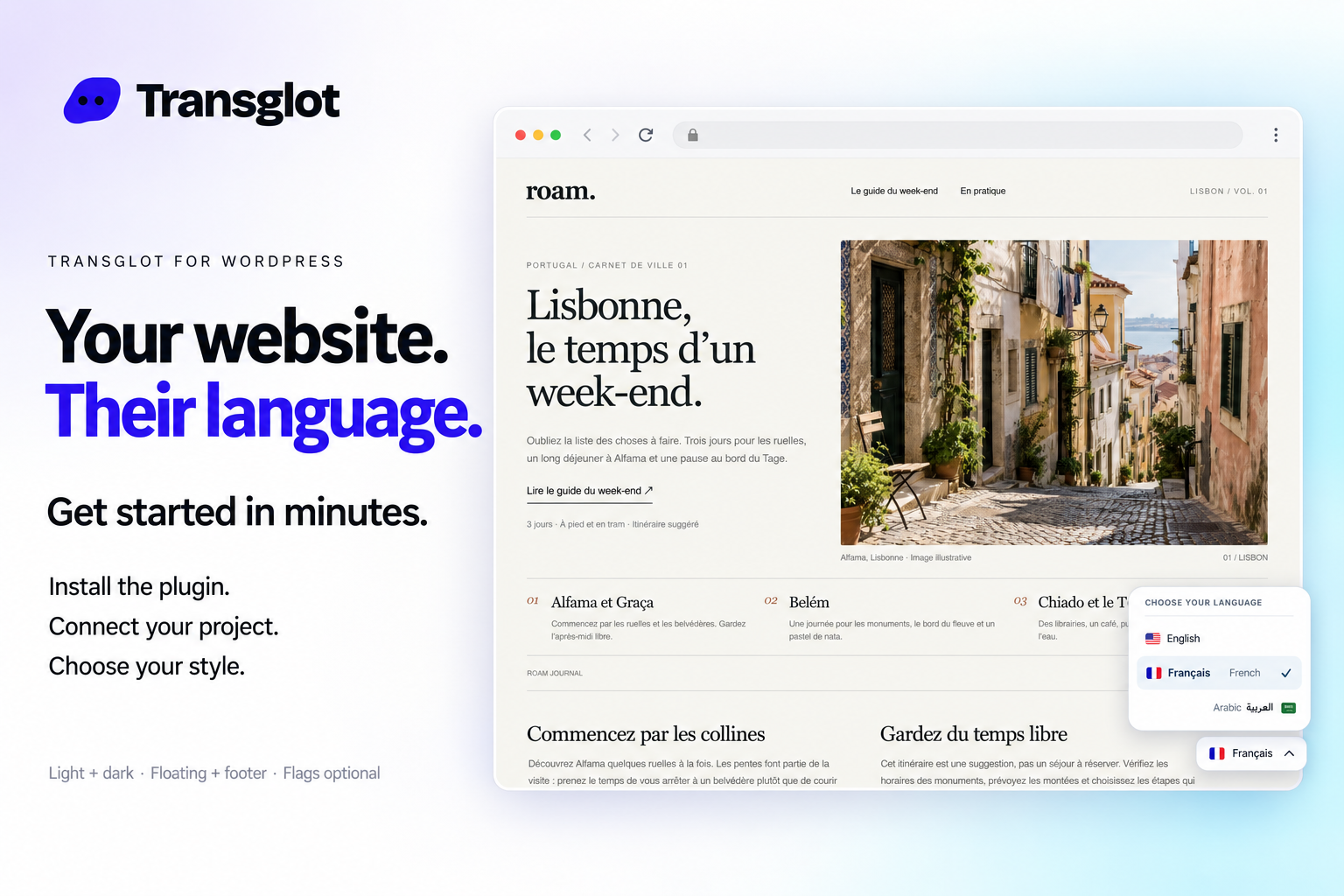
Transglot language switcher and localized WordPress website example
Example WordPress site with the Transglot language switcher.
ورک فلو

اپنا مواد منسلک کریں۔ ہر زبان کا جائزہ لیں۔

ایک بار منسلک کریں، اپنا مواد اور زبانیں منتخب کریں، پھر ایک ہی پروجیکٹ میں ترجمہ اور جائزہ لیں۔ نیچے دیے گئے مراحل بتاتے ہیں کہ یہ آپ کے ٹول میں کیسے کام کرتا ہے۔

  1. Install and pair the plugin

    Download the Transglot plugin ZIP. In WordPress, open Plugins → Add New Plugin → Upload Plugin, choose the ZIP and activate it. In your Transglot project, open WordPress settings and create a pairing code.

    pair
  2. Sync the source content

    Bring the selected posts and pages into the Transglot project.

    sync
  3. Translate and review

    Review target-language copy in the same project as your other localization content.

    نظر ثانی کریں
  4. Publish your site locales

    Publish the reviewed translations and check the language switcher and localized page URLs.

    شائع کریں
Publish reviewed translations to the connected WordPress site, with localized URLs and a configurable language switcher.
کیا منتقل ہوتا ہے

آپ کیا ترجمہ کر سکتے ہیں اور فراہم کر سکتے ہیں۔

اپنی WordPress سائٹ کو جوڑنے والے کوڈ کے ساتھ منسلک کریں۔ پوسٹز اور صفحات کو ہم وقت ساز کریں، Transglot میں تراجم کا جائزہ لیں، اور اپنی سائٹ کے مطابق زبان سوئچر کے ساتھ مقامی صفحات شائع کریں۔
آپ کیا ترجمہ کر سکتے ہیں اور فراہم کر سکتے ہیں۔
سطحکیا توقع کریں
ماخذ اور دائرہ کار

پوسٹس اور صفحات: عنوان، اقتباس اور مواد

ترجمہ شدہ آؤٹ پٹ

Publish reviewed translations to the connected WordPress site, with localized URLs and a configurable language switcher.

ذہن میں رکھیں

Choose the posts and pages to sync. Review translated pages, localized URLs, and your language switcher before sharing them with visitors.

منسلک ہو جائیں

اپنے پہلے کنکشن تک چند مراحل۔

نیچے اپنے ٹول کی سیٹ اپ کی پیروی کریں: کنکشن شامل کریں، ہم وقت سازی کے لیے چیزیں منتخب کریں، اور مواد کے چھوٹے سیٹ کے ساتھ اسے آزمائیں۔ آپ کی ٹول ان ٹولز میں کام جاری رکھ سکتی ہے جو وہ پہلے سے استعمال کر رہے ہیں۔

آپ کو کیا درکار ہے

WordPress پلگ ان میں درج کردہ پروجیکٹ جوڑنے والا کوڈ.

  • ایک Transglot پروجیکٹ جس کے ماخذ اور ہدف والے مقامات (locales) ترتیب دیے گئے ہوں۔
  • کنکشن کی سیٹنگز میں اسناد محفوظ کریں تاکہ آپ کی ٹیم فائلوں کے درمیان راز کاپی کیے بغیر کام کر سکے۔
  • ہوسٹڈ API رسائی کے لیے Transglot کا ادائیگی والا پلان درکار ہے۔ AI ترجمہ آپ کے ورک اسپیس کی الفاظ کی حد استعمال کرتا ہے۔
  1. Download the Transglot plugin ZIP. In WordPress, open Plugins → Add New Plugin → Upload Plugin, choose the ZIP and activate it.

  2. In your Transglot project, open WordPress settings and create a pairing code.

  3. In WordPress’s Transglot setup, paste the pairing code and complete the connection.

  4. Sync your source content, review the target translations, then publish them to the site. Configure the language switcher and URL settings in the plugin.

ایک ہی پروجیکٹ، مزید امکانات

اپنے ورک فلو کا باقی حصہ منسلک کریں۔

آپ کے تراجم ایک پروجیکٹ میں رہتے ہیں جب وہ ٹولز کے درمیان منتقل ہوتے ہیں۔

آپ جو پہلے سے چلا رہے ہیں اس کے ساتھ کام کرتا ہے

41 کنیکٹرز، پہلے سے تیار۔

اپنا ورک فلو لائیں

آپ کا مواد، ہر مقام (locale) کے لیے تیار۔

اپنے ٹولز منسلک کریں، اپنی ٹیم کے ساتھ ترجمہ کریں، اور جائزہ شدہ مواد شائع کریں۔
















