مواد پر جائیں

اختیاری تجزیات، سیشن ریکارڈنگ اور اشتہارات اس وقت تک بند رہتے ہیں جب تک آپ قبول نہ کریں۔ آپ انہیں مسترد کر سکتے ہیں اور Transglot استعمال کر سکتے ہیں۔ اپنا انتخاب کسی بھی وقت کوکی کی ترجیحات میں تبدیل کریں۔ کوکی پالیسی

تمام انٹیگریشنز
تفصیلات · کوڈ اور ڈیزائن

Figma and Transglot, see every locale in your design.

Install the development plugin and connect your project with a token. Select text to translate, then preview another language in your design without moving copy through spreadsheets.

Text layers → project → design previews
سمت
Text layers → project → design previews
پلان
Starter اور اس سے اوپر
نطاق
منتخب شدہ ٹیکسٹ لیئرز، Variable modes اور ترجمہ شدہ ڈیزائن کاپیز
تصدیقِ شناخت
پلگ ان میں تصدیق شدہ Transglot پروجیکٹ اکسیس ٹوکن
شروع کریں
Download the plugin and connect it to your Transglot project.
کوڈ اور ڈیزائن
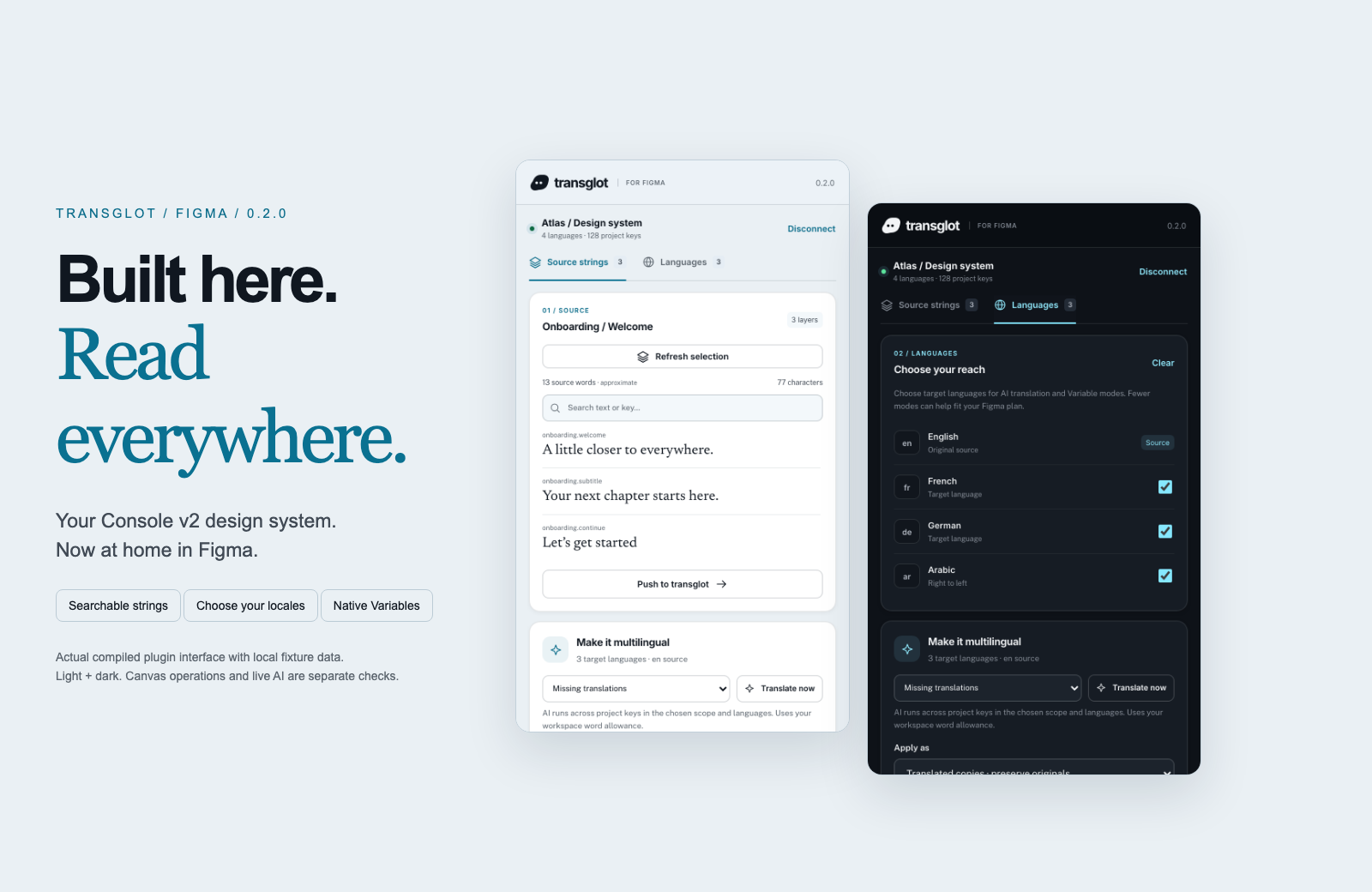
Transglot Figma plugin showing source strings, target languages, and localized design previews
Collect source strings, pull target locales, and inspect translated designs in the Transglot Figma plugin.
ورک فلو

اپنا مواد منسلک کریں۔ ہر زبان کا جائزہ لیں۔

ایک بار منسلک کریں، اپنا مواد اور زبانیں منتخب کریں، پھر ایک ہی پروجیکٹ میں ترجمہ اور جائزہ لیں۔ نیچے دیے گئے مراحل بتاتے ہیں کہ یہ آپ کے ٹول میں کیسے کام کرتا ہے۔

  1. Collect the text layers

    Select a frame or text layers and collect the strings you want to localize.

    collect
  2. Push to the project

    Send source text to Transglot with stable keys for the mapped layers.

    پُش
  3. Translate and pull

    Translate in your project or start a batch from the plugin, then pull the target locales.

    pull
  4. Review the localized design

    Preview Variable modes, reset the source view, or create translated copies and inspect the layout.

    preview
Apply translations to Variable modes or create translated copies so your team can inspect each locale on the canvas.
کیا منتقل ہوتا ہے

آپ کیا ترجمہ کر سکتے ہیں اور فراہم کر سکتے ہیں۔

ڈیزائن کا متن جمع کریں، اپنی ٹیم کے ساتھ اس کا ترجمہ کریں، اور Variable modes یا ترجمہ شدہ کاپیز کے ساتھ ہر لوکیل کا معائنہ کریں۔
آپ کیا ترجمہ کر سکتے ہیں اور فراہم کر سکتے ہیں۔
سطحکیا توقع کریں
ماخذ اور دائرہ کار

منتخب شدہ ٹیکسٹ لیئرز، Variable modes اور ترجمہ شدہ ڈیزائن کاپیز

ترجمہ شدہ آؤٹ پٹ

Apply translations to Variable modes or create translated copies so your team can inspect each locale on the canvas.

ذہن میں رکھیں

Variable modes depend on the limits of your Figma plan. Translated copies provide a separate preview workflow. Check fonts and layout after applying a locale.

منسلک ہو جائیں

اپنے پہلے کنکشن تک چند مراحل۔

نیچے اپنے ٹول کی سیٹ اپ کی پیروی کریں: کنکشن شامل کریں، ہم وقت سازی کے لیے چیزیں منتخب کریں، اور مواد کے چھوٹے سیٹ کے ساتھ اسے آزمائیں۔ آپ کی ٹول ان ٹولز میں کام جاری رکھ سکتی ہے جو وہ پہلے سے استعمال کر رہے ہیں۔

آپ کو کیا درکار ہے

پلگ ان میں تصدیق شدہ Transglot پروجیکٹ اکسیس ٹوکن.

  • ایک Transglot پروجیکٹ جس کے ماخذ اور ہدف والے مقامات (locales) ترتیب دیے گئے ہوں۔
  • کنکشن کی سیٹنگز میں اسناد محفوظ کریں تاکہ آپ کی ٹیم فائلوں کے درمیان راز کاپی کیے بغیر کام کر سکے۔
  • ہوسٹڈ API رسائی کے لیے Transglot کا ادائیگی والا پلان درکار ہے۔ AI ترجمہ آپ کے ورک اسپیس کی الفاظ کی حد استعمال کرتا ہے۔
  1. Download and extract the plugin ZIP. In Figma desktop, open Plugins → Development → Import plugin from manifest and select manifest.json.

  2. Create a Transglot project token with push and pull abilities; add manage if you want to start an AI translation batch.

  3. Open the plugin, enter the API URL and token, then test and save the connection.

  4. Collect the selected text layers, push the source, and pull target locales. Apply Variable modes or make translated copies to review the design.

ایک ہی پروجیکٹ، مزید امکانات

اپنے ورک فلو کا باقی حصہ منسلک کریں۔

آپ کے تراجم ایک پروجیکٹ میں رہتے ہیں جب وہ ٹولز کے درمیان منتقل ہوتے ہیں۔

آپ جو پہلے سے چلا رہے ہیں اس کے ساتھ کام کرتا ہے

41 کنیکٹرز، پہلے سے تیار۔

اپنا ورک فلو لائیں

آپ کا مواد، ہر مقام (locale) کے لیے تیار۔

اپنے ٹولز منسلک کریں، اپنی ٹیم کے ساتھ ترجمہ کریں، اور جائزہ شدہ مواد شائع کریں۔

















