پرش به محتوا

تحلیل‌های اختیاری، ضبط نشست و تبلیغات تا زمانی که نپذیرید غیرفعال می‌مانند. می‌توانید آن‌ها را رد کنید و از Transglot استفاده نمایید. هر زمان خواستید انتخاب خود را در ترجیحات کوکی تغییر دهید. سیاست کوکی‌ها

همه ادغام‌ها
برگه مشخصات · سیستم مدیریت محتوا و تجارت الکترونیک

WordPress and Transglot, publish a multilingual site.

Install the plugin, paste a pairing code, and choose the languages for your site. Sync posts and pages, then publish the translations your team approves, with localized URLs and a language switcher.

Source content in; reviewed translations out
جهت
Source content in; reviewed translations out
طرح
Starter و بالاتر
دامنه
نوشته‌ها و صفحات: عنوان، چکیده و محتوا
احراز هویت
یک کد جفت‌سازی پروژه که در افزونه WordPress وارد شده است
شروع کار
Download the plugin, install it in WordPress, and pair your site.

سیستم مدیریت محتوا و تجارت الکترونیک
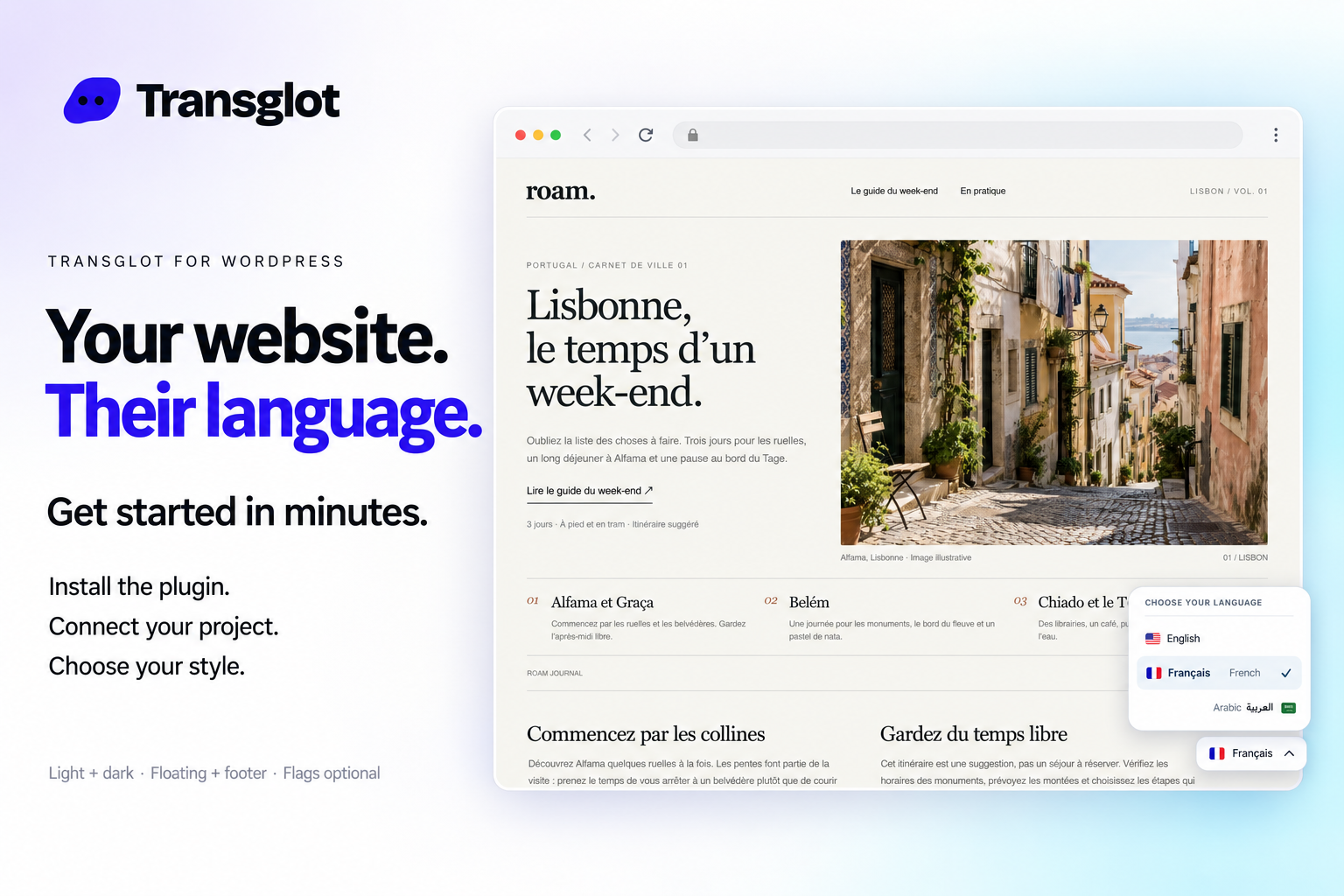
Transglot language switcher and localized WordPress website example
Example WordPress site with the Transglot language switcher.
گردش کار

محتوای خود را متصل کنید. هر زبان را بررسی کنید.

یک‌بار متصل شوید، محتوا و زبان‌های مورد نظر را انتخاب کنید، سپس در همان پروژه ترجمه و بازبینی نمایید. مراحل زیر نحوه عملکرد آن را در ابزار شما نشان می‌دهند.

  1. Install and pair the plugin

    Download the Transglot plugin ZIP. In WordPress, open Plugins → Add New Plugin → Upload Plugin, choose the ZIP and activate it. In your Transglot project, open WordPress settings and create a pairing code.

    pair
  2. Sync the source content

    Bring the selected posts and pages into the Transglot project.

    sync
  3. Translate and review

    Review target-language copy in the same project as your other localization content.

    بازبینی
  4. Publish your site locales

    Publish the reviewed translations and check the language switcher and localized page URLs.

    انتشار
Publish reviewed translations to the connected WordPress site, with localized URLs and a configurable language switcher.
آنچه جابه‌جا می‌شود

آنچه می‌توانید ترجمه و تحویل دهید.

سایت WordPress خود را با یک کد جفت‌سازی متصل کنید. نوشته‌ها و برگه‌ها را همگام‌سازی کنید، ترجمه‌ها را در Transglot بازبینی نمایید و صفحات بومی‌سازی شده را با تغییردهنده زبانی که با سایت شما هماهنگ است، منتشر کنید.
آنچه می‌توانید ترجمه و تحویل دهید.
سطحانتظارات
منبع و دامنه

نوشته‌ها و صفحات: عنوان، چکیده و محتوا

خروجی ترجمه‌شده

Publish reviewed translations to the connected WordPress site, with localized URLs and a configurable language switcher.

نکات مهم

Choose the posts and pages to sync. Review translated pages, localized URLs, and your language switcher before sharing them with visitors.

متصل شوید

چند مرحله تا اولین اتصال شما.

طبق راهنمای زیر برای ابزار خود عمل کنید: اتصال را اضافه کنید، موارد همگام‌سازی را انتخاب کرده و آن را با مجموعه کوچکی از محتوا آزمایش کنید. تیم شما می‌تواند به کار در ابزارهایی که هم‌اکنون استفاده می‌کنند، ادامه دهد.

موارد مورد نیاز

یک کد جفت‌سازی پروژه که در افزونه WordPress وارد شده است.

  • یک پروژه Transglot با پیکربندی زبان‌های مبدأ و مقصد.
  • اطلاعات احراز هویت را در تنظیمات اتصال ذخیره کنید تا تیم شما بدون کپی کردن کلیدهای امنیتی بین فایل‌ها بتواند کار کند.
  • دسترسی به API میزبان نیازمند طرح پرداختی Transglot است. ترجمه هوش مصنوعی از سهمیه کلمات فضای کاری شما استفاده می‌کند.
  1. Download the Transglot plugin ZIP. In WordPress, open Plugins → Add New Plugin → Upload Plugin, choose the ZIP and activate it.

  2. In your Transglot project, open WordPress settings and create a pairing code.

  3. In WordPress’s Transglot setup, paste the pairing code and complete the connection.

  4. Sync your source content, review the target translations, then publish them to the site. Configure the language switcher and URL settings in the plugin.

همان پروژه، امکانات بیشتر

بقیه گردش کار خود را متصل کنید.

ترجمه‌های شما هنگام جابه‌جایی بین ابزارها در یک پروژه باقی می‌مانند.

با ابزارهایی که هم‌اکنون استفاده می‌کنید سازگار است

41 اتصال‌دهنده، از پیش ساخته‌شده.

گردش کار خود را بیاورید

محتوای شما، آماده برای هر زبان.

ابزارهای خود را متصل کنید، با تیم خود ترجمه کنید و محتوای بازبینی‌شده را منتشر نمایید.


















