Saltatu edukira

Analitika aukerakoak, saio-grabazioak eta publizitatea desaktibatuta daude onartu arte. Baztertu egin ditzakezu eta Transglot erabili. Aldatu zure hautua noiznahi Cookieen hobespenak atalean. Cookie-politika

Integrazio guztiak
zehaztapen-orria · kodea eta diseinua

Figma and Transglot, see every locale in your design.

Install the development plugin and connect your project with a token. Select text to translate, then preview another language in your design without moving copy through spreadsheets.

Text layers → project → design previews
Norabidea
Text layers → project → design previews
Plana
Starter eta goragokoak
Irismena
hautatutako testu-geruzak, Aldagai moduak eta itzulitako diseinu-kopiak
Autentifikazioa
pluginean egiaztatutako Transglot proiektu-sarbide token bat
Hasi
Download the plugin and connect it to your Transglot project.
kodea eta diseinua
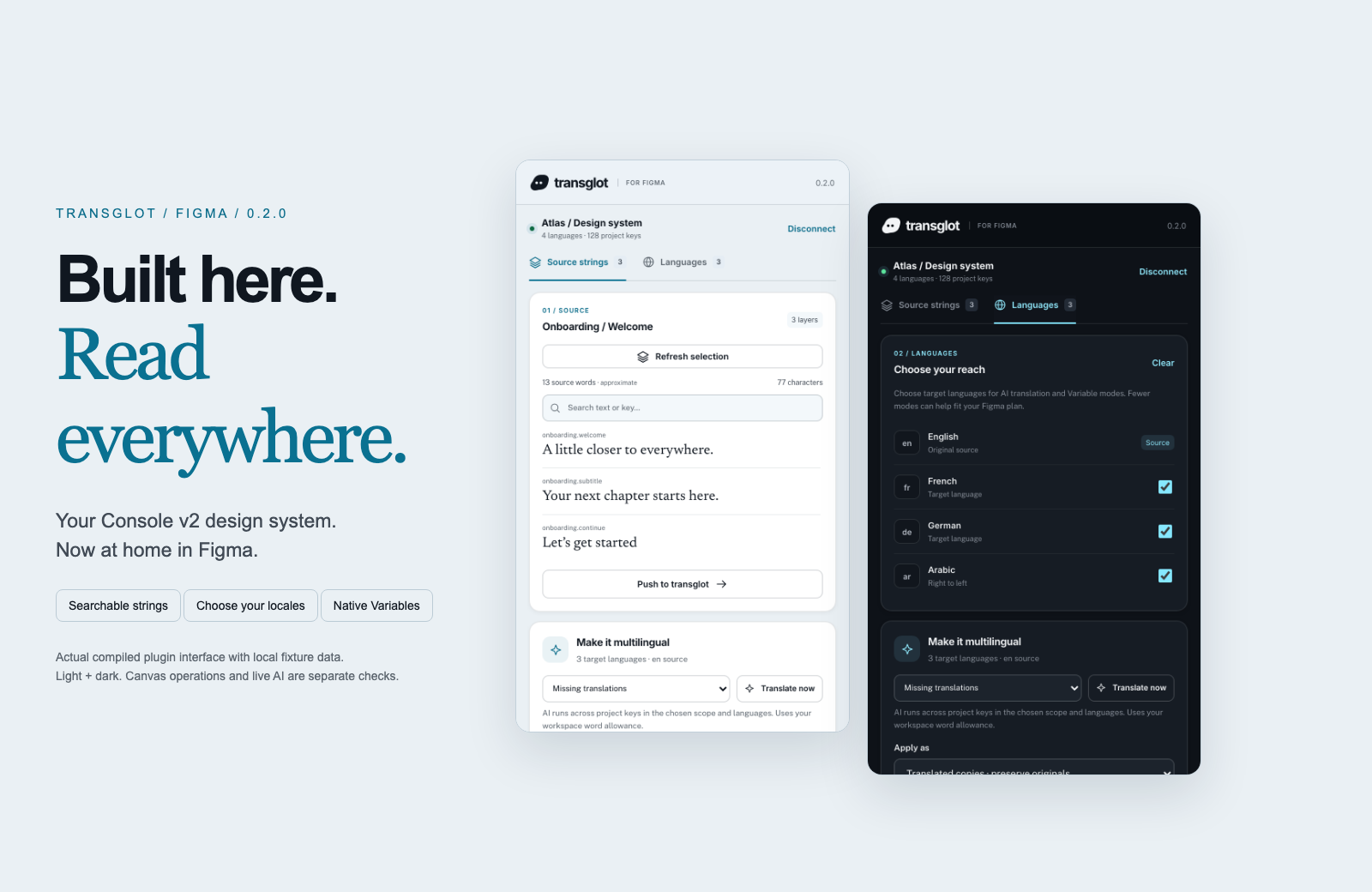
Transglot Figma plugin showing source strings, target languages, and localized design previews
Collect source strings, pull target locales, and inspect translated designs in the Transglot Figma plugin.
lan-fluxua

Konektatu zure edukia. Berrikusi hizkuntza guztiak.

Konektatu behin, aukeratu zure edukia eta hizkuntzak, gero itzuli eta berrikusi proiektu berean. Beheko urratsek nola funtzionatzen duen erakusten dute zure tresnan.

  1. Collect the text layers

    Select a frame or text layers and collect the strings you want to localize.

    collect
  2. Push to the project

    Send source text to Transglot with stable keys for the mapped layers.

    push
  3. Translate and pull

    Translate in your project or start a batch from the plugin, then pull the target locales.

    pull
  4. Review the localized design

    Preview Variable modes, reset the source view, or create translated copies and inspect the layout.

    preview
Apply translations to Variable modes or create translated copies so your team can inspect each locale on the canvas.
zer mugitzen den

Zer itzul eta entregatu dezakezun.

Bildu diseinu-testua, itzuli taldearekin batera, eta aztertu locale bakoitza Aldagai moduekin edo itzulitako kopiaekin.
Zer itzul eta entregatu dezakezun.
GainazalaZer espero
Jatorria eta irismena

hautatutako testu-geruzak, Aldagai moduak eta itzulitako diseinu-kopiak

Itzulitako irteera

Apply translations to Variable modes or create translated copies so your team can inspect each locale on the canvas.

Gogoan izan

Variable modes depend on the limits of your Figma plan. Translated copies provide a separate preview workflow. Check fonts and layout after applying a locale.

konektatu zaitez

Lehen konexiorako urrats batzuk.

Jarraitu zure tresnaren ezarpenari behean: gehitu konexioa, aukeratu zer sinkronizatu, eta probatu eduki-multzo txiki batekin. Zure taldea lehendik erabiltzen dituen tresnetan lanean jarrai dezake.

Zer behar duzun

pluginean egiaztatutako Transglot proiektu-sarbide token bat.

  • Transglot proiektu bat, jatorrizko eta helburuko lokalizazioak konfiguratuta.
  • Gorde kredentzialak konexio-ezarpenetan, zure taldeak sekretuak fitxategien artean kopiatu gabe lan egin dezan.
  • Ostatatutako API sarbideak Transglot ordainpeko plan bat eskatzen du. AI bidezko itzulpenak zure lan-espazioko hitz-kopurua erabiltzen du.
  1. Download and extract the plugin ZIP. In Figma desktop, open Plugins → Development → Import plugin from manifest and select manifest.json.

  2. Create a Transglot project token with push and pull abilities; add manage if you want to start an AI translation batch.

  3. Open the plugin, enter the API URL and token, then test and save the connection.

  4. Collect the selected text layers, push the source, and pull target locales. Apply Variable modes or make translated copies to review the design.

proiektu bera, aukera gehiago

Konektatu zure lan-fluxuaren gainerakoa.

Zure itzulpenak proiektu bakarrean mantentzen dira tresnen artean mugitzen diren bitartean.

dagoeneko erabiltzen duzunarekin funtzionatzen du

41 konektore, jada eraikiak.

ekarri zure lan-fluxua

Zure edukia, lokalizazio guztietarako prest.

Konektatu zure tresnak, itzuli zure taldearekin, eta argitaratu berrikusitako edukia.


















