Lewati ke konten

Analitik opsional, perekaman sesi, dan iklan tetap nonaktif kecuali Anda menerimanya. Anda dapat menolaknya dan tetap menggunakan Transglot. Ubah pilihan Anda kapan saja di Preferensi cookie. Kebijakan Cookie

Semua integrasi
lembar spesifikasi · kode & desain

Figma and Transglot, see every locale in your design.

Install the development plugin and connect your project with a token. Select text to translate, then preview another language in your design without moving copy through spreadsheets.

Text layers → project → design previews
Arah
Text layers → project → design previews
Paket
Starter ke atas
Cakupan
lapisan teks yang dipilih, mode Variabel, dan salinan desain terjemahan
Autentikasi
token akses proyek Transglot yang diverifikasi di plugin
Mulai
Download the plugin and connect it to your Transglot project.
kode & desain
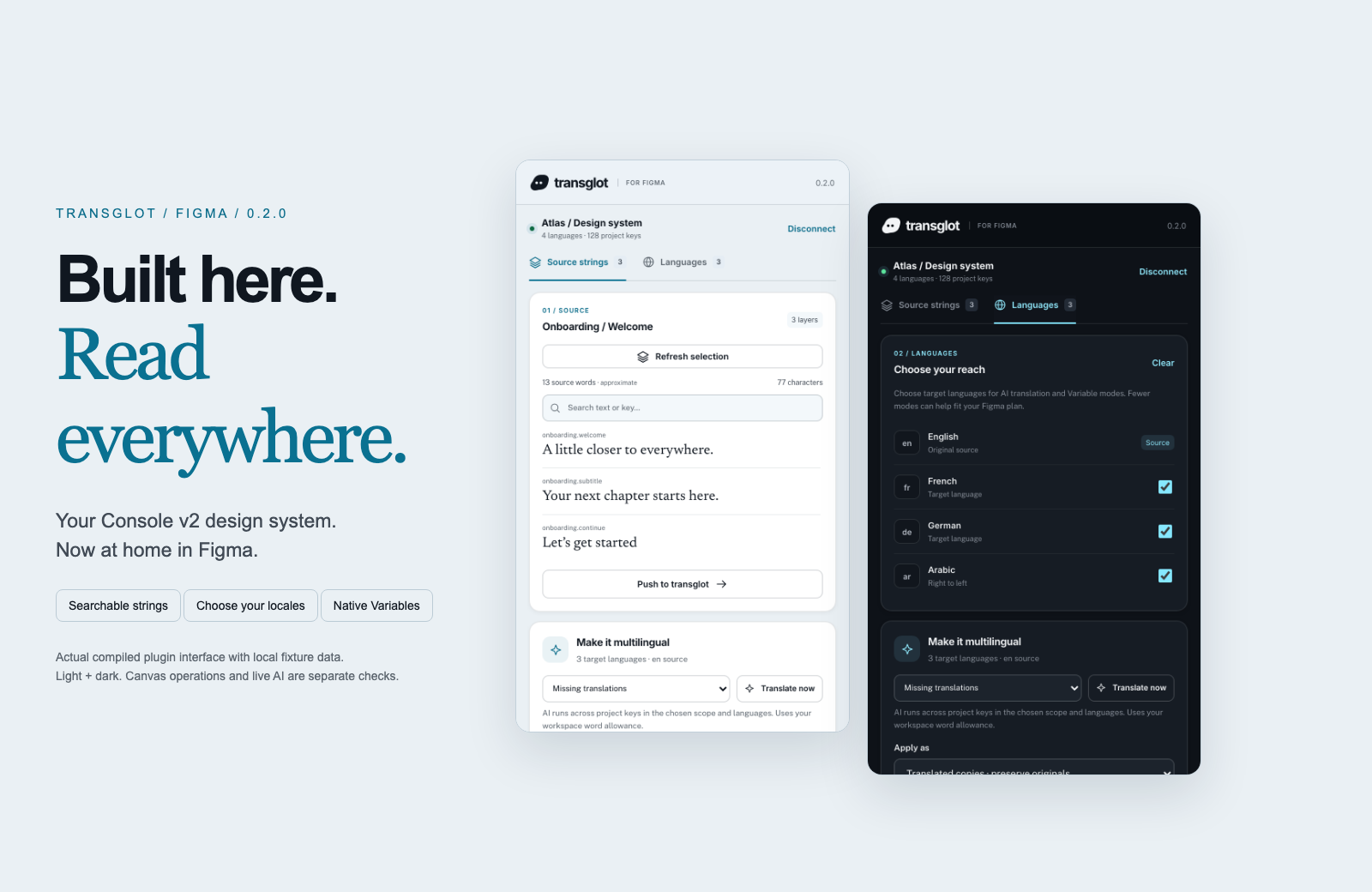
Transglot Figma plugin showing source strings, target languages, and localized design previews
Collect source strings, pull target locales, and inspect translated designs in the Transglot Figma plugin.
alur kerja

Hubungkan konten Anda. Tinjau setiap bahasa.

Hubungkan sekali, pilih konten dan bahasa Anda, lalu terjemahkan dan tinjau dalam proyek yang sama. Langkah-langkah di bawah menunjukkan cara kerjanya di alat Anda.

  1. Collect the text layers

    Select a frame or text layers and collect the strings you want to localize.

    collect
  2. Push to the project

    Send source text to Transglot with stable keys for the mapped layers.

    push
  3. Translate and pull

    Translate in your project or start a batch from the plugin, then pull the target locales.

    pull
  4. Review the localized design

    Preview Variable modes, reset the source view, or create translated copies and inspect the layout.

    preview
Apply translations to Variable modes or create translated copies so your team can inspect each locale on the canvas.
apa yang bergerak

Apa yang dapat Anda terjemahkan dan kirimkan.

Kumpulkan teks desain, terjemahkan bersama tim Anda, dan periksa setiap lokal dengan mode Variabel atau salinan terjemahan.
Apa yang dapat Anda terjemahkan dan kirimkan.
PermukaanYang perlu diharapkan
Sumber dan cakupan

lapisan teks yang dipilih, mode Variabel, dan salinan desain terjemahan

Output terjemahan

Apply translations to Variable modes or create translated copies so your team can inspect each locale on the canvas.

Perlu diingat

Variable modes depend on the limits of your Figma plan. Translated copies provide a separate preview workflow. Check fonts and layout after applying a locale.

mulai terhubung

Beberapa langkah untuk koneksi pertama Anda.

Ikuti panduan penyiapan alat Anda di bawah ini: tambahkan koneksi, pilih apa yang akan disinkronkan, dan coba dengan sekumpulan kecil konten. Tim Anda dapat terus bekerja di alat yang sudah mereka gunakan.

Yang Anda butuhkan

token akses proyek Transglot yang diverifikasi di plugin.

  • Proyek Transglot dengan locale sumber dan target yang telah dikonfigurasi.
  • Simpan kredensial di pengaturan koneksi agar tim Anda dapat bekerja tanpa menyalin rahasia antar file.
  • Akses API yang dihosting memerlukan paket Transglot berbayar. Terjemahan AI menggunakan kuota kata workspace Anda.
  1. Download and extract the plugin ZIP. In Figma desktop, open Plugins → Development → Import plugin from manifest and select manifest.json.

  2. Create a Transglot project token with push and pull abilities; add manage if you want to start an AI translation batch.

  3. Open the plugin, enter the API URL and token, then test and save the connection.

  4. Collect the selected text layers, push the source, and pull target locales. Apply Variable modes or make translated copies to review the design.

proyek sama, lebih banyak kemungkinan

Hubungkan sisa alur kerja Anda.

Terjemahan Anda tetap berada dalam satu proyek saat berpindah antar alat.

berfungsi dengan apa yang sudah Anda jalankan

41 konektor, sudah tersedia.

bawa alur kerja Anda

Konten Anda, siap untuk setiap locale.

Hubungkan alat Anda, terjemahkan bersama tim, dan publikasikan konten yang telah ditinjau.


















