Preskočiť na obsah

Voliteľná analytika, nahrávanie relácií a reklama zostanú vypnuté, pokiaľ ich neprijmete. Môžete ich odmietnuť a používať Transglot. Svoju voľbu môžete kedykoľvek zmeniť v Predvoľby cookies. Zásady používania cookies

Všetky integrácie
špecifikácia · kód a dizajn

Figma and Transglot, see every locale in your design.

Install the development plugin and connect your project with a token. Select text to translate, then preview another language in your design without moving copy through spreadsheets.

Text layers → project → design previews
Smer
Text layers → project → design previews
Plán
Starter a vyššie
Rozsah
vybrané textové vrstvy, režimy premenných a preložené dizajnové kópie
Overovanie
prístupový token projektu Transglot overený v plugine
Začať
Download the plugin and connect it to your Transglot project.
kód a dizajn
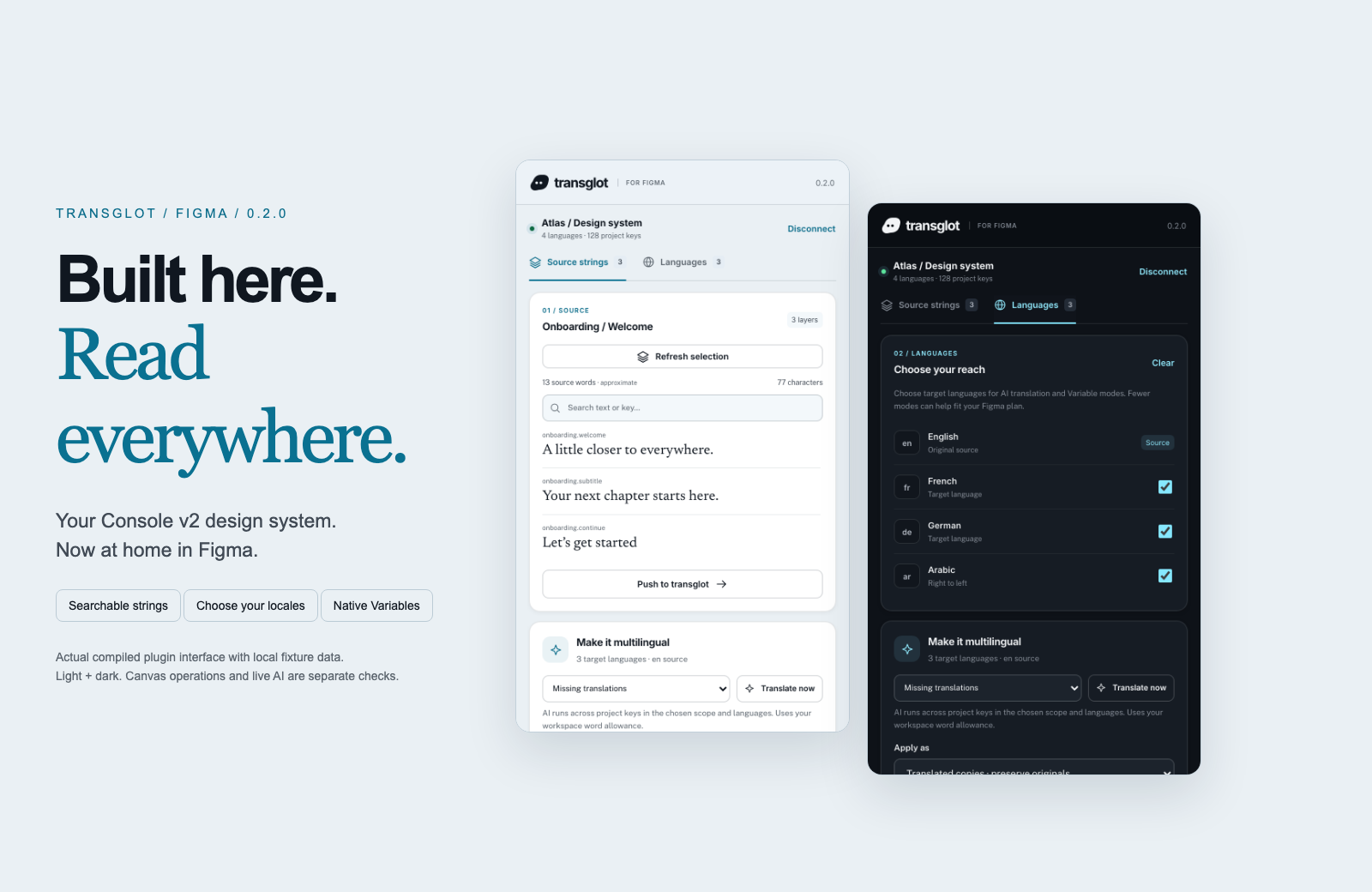
Transglot Figma plugin showing source strings, target languages, and localized design previews
Collect source strings, pull target locales, and inspect translated designs in the Transglot Figma plugin.
pracovný postup

Prepojte svoj obsah. Skontrolujte každý jazyk.

Jednorazovo sa pripojte, vyberte svoj obsah a jazyky a potom prekladajte a kontrolujte v rámci toho istého projektu. Nasledujúce kroky ukazujú, ako to funguje vo vašom nástroji.

  1. Collect the text layers

    Select a frame or text layers and collect the strings you want to localize.

    collect
  2. Push to the project

    Send source text to Transglot with stable keys for the mapped layers.

    push
  3. Translate and pull

    Translate in your project or start a batch from the plugin, then pull the target locales.

    pull
  4. Review the localized design

    Preview Variable modes, reset the source view, or create translated copies and inspect the layout.

    preview
Apply translations to Variable modes or create translated copies so your team can inspect each locale on the canvas.
čo sa presúva

Čo môžete prekladať a doručovať.

Zhromaždite text z dizajnu, preložte ho so svojím tímom a skontrolujte každú lokalitu pomocou režimov premenných alebo preložených kópií.
Čo môžete prekladať a doručovať.
PovrchČo očakávať
Zdroj a rozsah

vybrané textové vrstvy, režimy premenných a preložené dizajnové kópie

Preložený výstup

Apply translations to Variable modes or create translated copies so your team can inspect each locale on the canvas.

Majte na pamäti

Variable modes depend on the limits of your Figma plan. Translated copies provide a separate preview workflow. Check fonts and layout after applying a locale.

pripojte sa

Niekoľko krokov k vášmu prvému pripojeniu.

Postupujte podľa nižšie uvedených pokynov pre váš nástroj: pridajte pripojenie, vyberte, čo synchronizovať, a otestujte to na malej vzorke obsahu. Váš tím môže ďalej pracovať v nástrojoch, ktoré už používa.

Čo potrebujete

prístupový token projektu Transglot overený v plugine.

  • Projekt Transglot s nakonfigurovanými zdrojovými a cieľovými lokalizáciami.
  • Uložte poverenia do nastavení pripojenia, aby váš tím mohol pracovať bez kopírovania tajných kľúčov medzi súbormi.
  • Prístup k hostovanému API vyžaduje platený plán Transglot. Preklad pomocou AI využíva slovnú kvótu vášho pracovného priestoru.
  1. Download and extract the plugin ZIP. In Figma desktop, open Plugins → Development → Import plugin from manifest and select manifest.json.

  2. Create a Transglot project token with push and pull abilities; add manage if you want to start an AI translation batch.

  3. Open the plugin, enter the API URL and token, then test and save the connection.

  4. Collect the selected text layers, push the source, and pull target locales. Apply Variable modes or make translated copies to review the design.

ten istý projekt, viac možností

Prepojte zvyšok svojho pracovného postupu.

Vaše preklady zostávajú v jednom projekte, keď sa presúvajú medzi nástrojmi.

funguje s tým, čo už používate

41 konektorov, už vytvorených.

prineste si svoj pracovný postup

Váš obsah, pripravený pre každú lokalizáciu.

Pripojte svoje nástroje, prekladajte so svojím tímom a publikujte skontrolovaný obsah.


















