सामग्री पर जाएं

वैकल्पिक एनालिटिक्स, सेशन रिकॉर्डिंग और विज्ञापन तब तक बंद रहते हैं जब तक आप स्वीकार नहीं करते। आप उन्हें अस्वीकार कर सकते हैं और Transglot का उपयोग कर सकते हैं। अपनी पसंद को कुकी प्राथमिकताएँ में कभी भी बदलें। कुकी नीति

सभी इंटीग्रेशन
स्पेक शीट · कोड और डिज़ाइन

Sketch and Transglot, localize the text in your design.

Install the plugin with a double-click and connect your project with a token. Push selected text layers, draft translations, and apply another language directly in Sketch.

Selected design text and translated layers
दिशा
Selected design text and translated layers
योजना
Starter और ऊपर
दायरा
चयनित टेक्स्ट लेयर्स, लेयर टेक्स्ट में वापस लिखे गए
प्रमाणीकरण
एक प्रोजेक्ट डिप्लॉय टोकन, जिसे सहेजे जाने से पहले सत्यापित किया जाता है
शुरू करें
Download Transglot 0.1.1 for Sketch 97 or later.

कोड और डिज़ाइन
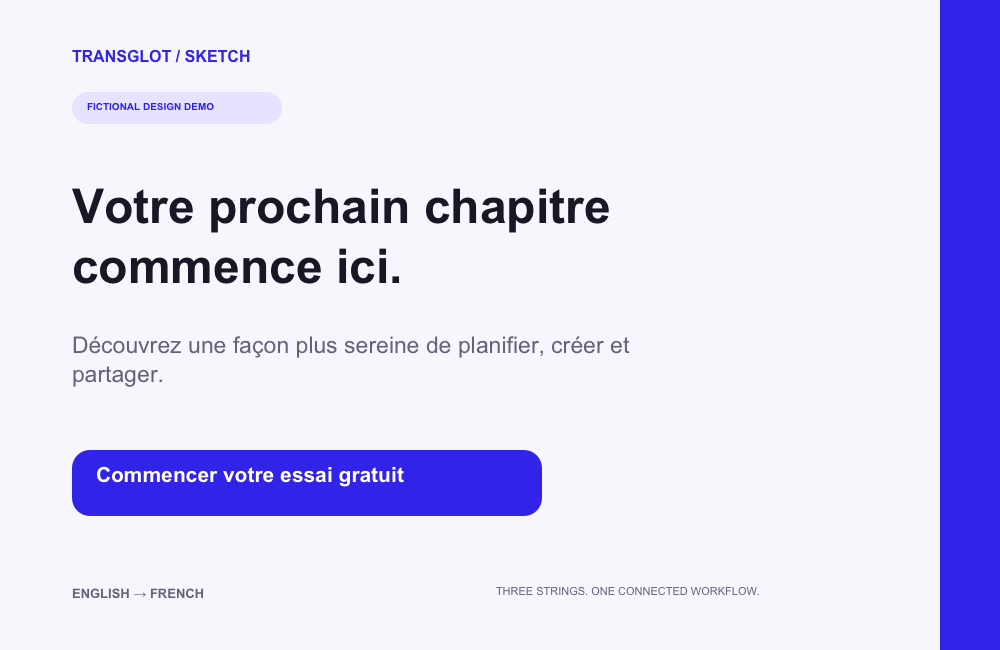
A fictional three-string design translated into French and rendered from the saved Sketch document
Real Sketch output: the same three text layers after pushing English copy, translating with AI, and applying French.
वर्कफ़्लो

अपनी सामग्री कनेक्ट करें। हर भाषा की समीक्षा करें।

एक बार कनेक्ट करें, अपनी सामग्री और भाषाएँ चुनें, फिर उसी प्रोजेक्ट में अनुवाद और समीक्षा करें। नीचे दिए गए चरण दिखाते हैं कि यह आपके टूल में कैसे काम करता है।

  1. Select design text

    Choose the text nodes you want to send from Sketch to your localization project.

    select
  2. Connect the project

    Enter a project token in the plugin and verify the project before saving the connection.

    connect
  3. Push and translate

    Push the selected source text, then translate and review the resulting project keys.

    समीक्षा करें
  4. Apply a target locale

    Pull the locale and apply its translated text to the mapped layers. Review the resulting layout.

    लागू करें
Pulled translations are applied to the mapped text layers in your open design.
क्या स्थानांतरित होता है

आप क्या अनुवाद और वितरित कर सकते हैं।

अपने Sketch डिज़ाइन्स को पहले से बनाई गई लेयर्स को बदले बिना दूसरी भाषा में ले जाएं। चयनित टेक्स्ट पुश करें, अपनी टीम के साथ अनुवाद करें और उसी मैप्ड लेयर्स पर एक टारगेट लोकल लागू करें।
आप क्या अनुवाद और वितरित कर सकते हैं।
सर्फेसक्या उम्मीद करें
स्रोत और दायरा

चयनित टेक्स्ट लेयर्स, लेयर टेक्स्ट में वापस लिखे गए

अनुवादित आउटपुट

Pulled translations are applied to the mapped text layers in your open design.

ध्यान रखें

The plugin works with selected text nodes. Review font availability and layout after applying a target locale.

कनेक्ट हो जाएँ

अपने पहले कनेक्शन के लिए कुछ चरण।

नीचे अपने टूल का सेटअप करें: कनेक्शन जोड़ें, सिंक करने वाली चीज़ें चुनें, और सामग्री के एक छोटे सेट के साथ इसे आजमाएँ। आपकी टीम उन टूल्स में काम करना जारी रख सकती है जिनका वे पहले से उपयोग कर रहे हैं।

आपको क्या चाहिए

एक प्रोजेक्ट डिप्लॉय टोकन, जिसे सहेजे जाने से पहले सत्यापित किया जाता है.

  • एक Transglot प्रोजेक्ट जिसमें इसके स्रोत और लक्ष्य लोकल कॉन्फ़िगर किए गए हों।
  • कनेक्शन सेटिंग्स में क्रेडेंशियल्स सहेजें ताकि आपकी टीम फ़ाइलों के बीच सीक्रेट कॉपी किए बिना काम कर सके।
  • होस्टेड API एक्सेस के लिए Transglot की पेड प्लान आवश्यक है। AI अनुवाद आपके वर्कस्पेस के शब्द सीमा का उपयोग करता है।
  1. Download the plugin ZIP, unzip it, and double-click transglot.sketchplugin to install it in Sketch 97 or later.

  2. Create a Transglot project with its source and target locales configured.

  3. Create a project access token with push, pull and manage abilities. Open Plugins → Transglot → Set token… and verify the connection.

  4. Select a group or text layers, push the source text, translate with AI, then use Pull & apply a locale… to bring a target language into the design.

एक ही प्रोजेक्ट, अधिक संभावनाएँ

अपने वर्कफ़्लो के बाकी हिस्से को कनेक्ट करें।

टूल्स के बीच स्थानांतरण के दौरान भी आपके अनुवाद एक ही प्रोजेक्ट में रहते हैं।

उन टूल्स के साथ काम करता है जिनका आप पहले से उपयोग कर रहे हैं

41 कनेक्टर, पहले से निर्मित।

अपना वर्कफ़्लो लाएँ

आपकी सामग्री, हर लोकल के लिए तैयार।

अपने टूल्स को कनेक्ट करें, अपनी टीम के साथ अनुवाद करें, और समीक्षा की गई सामग्री प्रकाशित करें।

















