דלג לתוכן

ניתוחים אופציונליים, הקלטת הפעלה ופרסום נשארים כבויים אלא אם תקבלו אותם. ניתן לדחות אותם ולהשתמש ב-Transglot. ניתן לשנות את הבחירה בכל עת ב-העדפות עוגיות. מדיניות עוגיות

כל האינטגרציות
גיליון מפרט · קוד ועיצוב

Sketch and Transglot, localize the text in your design.

Install the plugin with a double-click and connect your project with a token. Push selected text layers, draft translations, and apply another language directly in Sketch.

Selected design text and translated layers
כיוון
Selected design text and translated layers
תוכנית
Starter ומעלה
היקף
שכבות טקסט נבחרות, נכתבות חזרה לטקסט השכבה
אימות
אסימון פריסה (deploy token) של פרויקט, מאומת לפני השמירה
התחלה
Download Transglot 0.1.1 for Sketch 97 or later.

קוד ועיצוב
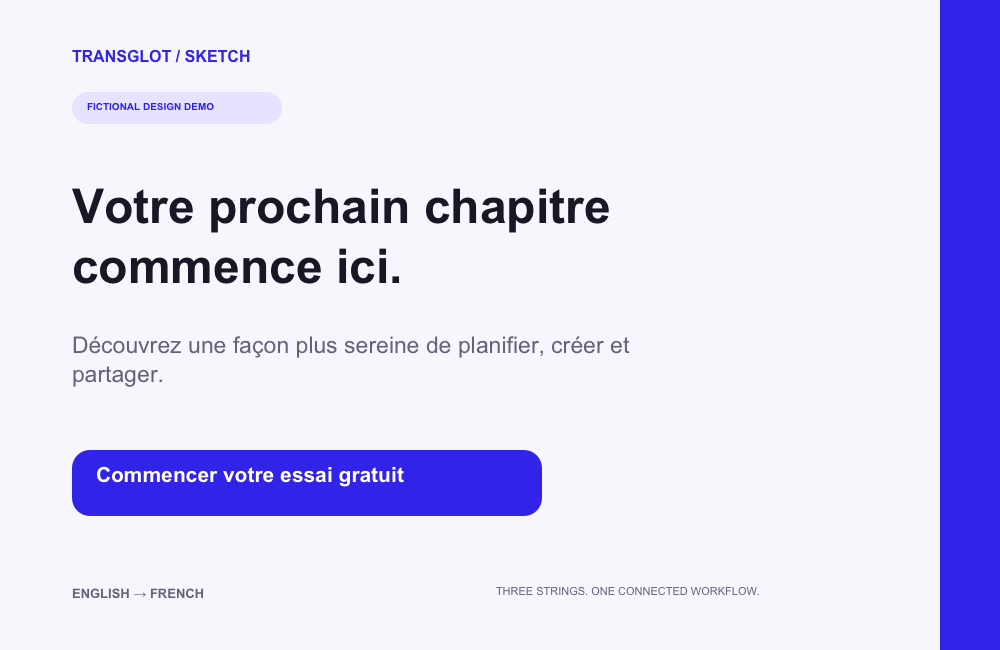
A fictional three-string design translated into French and rendered from the saved Sketch document
Real Sketch output: the same three text layers after pushing English copy, translating with AI, and applying French.
תהליך העבודה

חברו את התוכן שלכם. סקרו כל שפה.

חברו פעם אחת, בחרו את התוכן והשפות, ואז תרגמו וסקרו באותו פרויקט. השלבים הבאים מראים איך זה עובד בכלי שלכם.

  1. Select design text

    Choose the text nodes you want to send from Sketch to your localization project.

    select
  2. Connect the project

    Enter a project token in the plugin and verify the project before saving the connection.

    connect
  3. Push and translate

    Push the selected source text, then translate and review the resulting project keys.

    סקירה
  4. Apply a target locale

    Pull the locale and apply its translated text to the mapped layers. Review the resulting layout.

    יישום
Pulled translations are applied to the mapped text layers in your open design.
מה זז

מה ניתן לתרגם ולספק.

העבירו את עיצובי Sketch שלכם לשפה אחרת מבלי להחליף את השכבות שכבר בנייתם. דחפו טקסט נבחר, תרגמו עם הצוות והחילו אזור יעד על אותן שכבות ממפות.
מה ניתן לתרגם ולספק.
משטחמה לצפות
מקור והיקף

שכבות טקסט נבחרות, נכתבות חזרה לטקסט השכבה

פלט מתורגם

Pulled translations are applied to the mapped text layers in your open design.

שימו לב

The plugin works with selected text nodes. Review font availability and layout after applying a target locale.

התחברו

כמה צעדים לחיבור הראשון שלכם.

פעלו לפי ההגדרות של הכלי שלכם למטה: הוסיפו את החיבור, בחרו מה לסנכרן ונסו זאת עם קבוצה קטנה של תוכן. הצוות שלכם יכול להמשיך לעבוד בכלים שכבר בשימוש.

מה נדרש

אסימון פריסה (deploy token) של פרויקט, מאומת לפני השמירה.

  • פרויקט Transglot עם הגדרת שפות המקור והיעד.
  • שמרו את האישורים בהגדרות החיבור כדי שהצוות שלכם יוכל לעבוד ללא העתקת סודות בין קבצים.
  • גישה ל-API מאוחסן דורשת חבילת Transglot בתשלום. תרגום AI משתמש במכסת המילים של סביבת העבודה שלכם.
  1. Download the plugin ZIP, unzip it, and double-click transglot.sketchplugin to install it in Sketch 97 or later.

  2. Create a Transglot project with its source and target locales configured.

  3. Create a project access token with push, pull and manage abilities. Open Plugins → Transglot → Set token… and verify the connection.

  4. Select a group or text layers, push the source text, translate with AI, then use Pull & apply a locale… to bring a target language into the design.

אותו פרויקט, יותר אפשרויות

חברו את שאר תהליך העבודה שלכם.

התרגומים שלכם נשארים בפרויקט אחד כשהם עוברים בין כלים.

עובד עם מה שכבר מופעל אצלך

41 מחברים, כבר מובנים.

הביאו את תהליך העבודה שלכם

התוכן שלכם, מוכן לכל שפה.

חברו את הכלים שלכם, תרגמו עם הצוות שלכם ופרסמו תוכן שעבר סקירה.

















